
Manage attachements in tickets so they can be found
Additional information on a ticket can be transmitted in attached files, not only texts, but also screenshots, sketches, etc. An attached file can also provide additional information in a comment with a suggested solution. However, if there are many attachments in many comments on a ticket, it is difficult to keep track of them all.
This was also the case for one of our customers, so we expanded the HelpDesk for them with the help of a special control to ensure that all ticket attachments can be found easily.
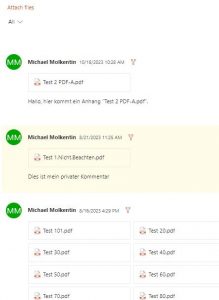
Normally, an attachment is displayed in the ticket at the point where it was added to the ticket, i.e. either in the ticket description or in the respective comment. However, this also means that you have to scroll a lot in a ticket with many comments and many attachments in order to access the information in the attachments.
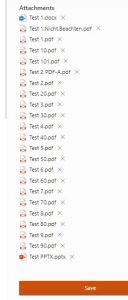
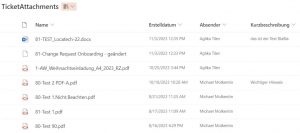
We remedy this by creating a separate document library for the attachments of all tickets in the ticket system. A flow triggered by the creation of a comment ensures that the attachments are stored here. All file attachments in the HelpDesk can be searched across all tickets in the document library.
All attachments of a ticket are saved on the ticket, not on the respective comment. However, a comment contains information about which attachment was sent with it, and therefore who sent the attachment and when it was added to the ticket.
The attachments are saved in the document library under a unique name, which is made up of the ticket ID and the original name of the attached file. The creator and creation date are added as metadata. The unique naming of file attachments within a ticket is already done by default in the HelpDesk. This can then be clearly displayed in a view of the document library. A column is also provided for a brief description of the respective attachment.
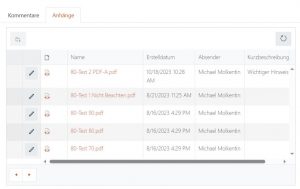
Attachments from comments can also be added to the document library at a later date.
For the correct commissioning of the document library for the ticket attachments, a flow developed by us runs through all comments of all tickets and, if available, enters the file attachments into the document library. This procedure preserves the chronological order of the comments and file attachments created.
Another flow then takes care of new comments and their attachments.
We would be happy to show you this option for managing ticket attachments live in an online demo!