Open PDF-files from SharePoint/Teams in client app
SharePoint Online has proven to be a more than suitable platform for good document management and joint editing of files. And it often proves advantageous to save and edit documents in PDF format. But this combination can also lead to difficulties…
Because unfortunately it is currently not planned by default to open PDF files directly from SharePoint for editing in a corresponding app on the local computer. It is only possible to open it in view mode in the browser; for editing, the file must first be downloaded and saved locally. This leads to redundant clicks, is cumbersome and not necessarily conducive to productivity.
For one of our customers, who also uses Microsoft Teams as a tool for collaboration and communication, we took on exactly this problem and found a solution:
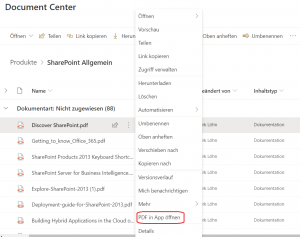
With the help of a SharePoint app, we have expanded the context menu for files in the document library with an item „Open PDF in app“: